

If your Gmail looks suddenly different, you should know about one of Google’s latest AI features known as “AI inbox.”
Google launched its Gemini-powered “AI inbox” feature earlier this year, and it is currently available to more users with Google AI plans in beta, so you may see it appear as a listed option titled “AI inbox” below your regular inbox within Gmail.
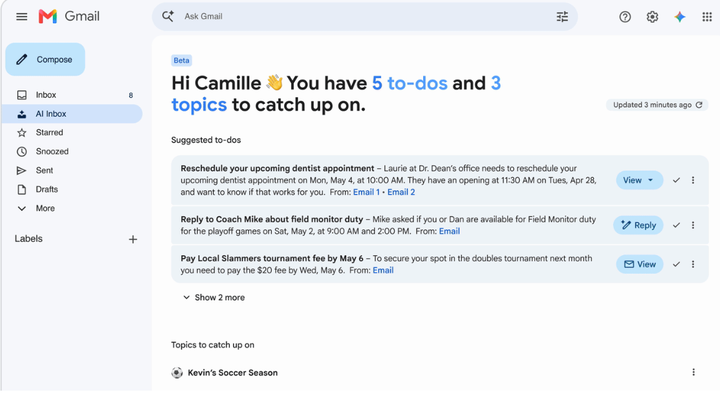
If you use this feature, which is currently only available in the United States and in English, AI inbox will scan your emails in your primary inbox to quickly summarize upcoming meetings and suggest household to-dos to prioritize.
It will not surface any attachments, but it may bold due dates for a credit-card bill, your upcoming restaurant reservations or package deliveries, for example. You can mark your AI-generated to-do list as “done” when you complete tasks or you can remove inappropriate to-dos from your list too.
This may help people quickly catch up on their inboxes, but you should know there are downsides to letting AI have so much access to your life.
Harlo Holmes, chief security programs officer at Freedom of the Press Foundation, said this feature could be helpful for people needing reminders about upcoming appointments but she wouldn’t use it herself.
“I personally am not enthusiastic about correspondence with my doctors winding up not only in my Google inbox but also being worked on by AI in such a way,” Holmes said.
“Features like this are a good reminder that email tends not to be terribly private to begin with,” said Thorin Klosowski, a security and privacy activist for the Electronic Frontier Foundation. “Gmail’s consistent rollout of AI features in particular really showcases just how much access Google the company has to people’s lives.”
SOPA Images via Getty Images
If you do use this feature, you should still double-check what it tells you before you automatically accept its suggested priorities as fact. Do not trust urgent warnings that seem unlikely for you to receive by email.
You should know that motivated bad actors use indirect prompt injection to send emails that will get an AI agent to follow malicious instructions. Holmes gave the example of an AI agent being tricked by a malicious actor in order to say, “Oh, this isn’t spam, you should totally click on this link, or it summarizes your notifications” and as a result, a user may be tricked into following up on a suspicious notification.
In an April security blog post, Google said it is aware of the threat of indirect prompt injection within emails and its team has been “relentlessly pressure-testing our systems to ensure Gemini is robust to adversarial manipulation.”
“While these are edge cases at this point, there are definitely a lot of criminals who love this challenge and are going to be trying all of these AI models, not only Gemini, in order to see how far they can get,” Holmes said.
One way to opt out of this “AI inbox” feature is to opt out of all personalized AI content within Gmail. To do this, go into your settings and select the “General” tab. From there, you can unselect the box for “Smart features” that “agree to let Gmail, Chat, and Meet use your content and activity in these products to provide smart features and personalize your experience,” according to Google. This will turn off email summaries and it will also keep AI features from appearing in your Drive, Calendar, Docs, Sheets, Slides or Meet.
Or better yet, you can keep your most sensitive conversations to a different platform than Gmail, like end-to-end encrypted services like Signal or the Proton email service.
“As a technology, email can be a struggle to make truly private, and I’d suggest people look to alternative communication options, like secure messaging apps, whenever they can,” Klosowski said.

