

If you get an alarming text from Apple about “mercenary spyware,” don’t delete it and ignore what you read. This text isn’t spam. It’s a real warning Apple users are getting that they should act upon quickly.
The official notification will read: “Apple detected a mercenary spyware attack targeted at your iPhone. There are actions you can take now to protect your data and device.” The sender will be named “Apple Threat Notifications” when you get the alert by text, and the email address associated with your Apple account will also receive the warning from the following address: [email protected].
Apple confirmed to HuffPost that threat notifications were sent on Aug. 13 to targeted users in 110 countries, and to date, users have been notified in over 150 countries in total. It is unclear how many users in the U.S. were affected.
Unlike general scams that target broad groups, a mercenary spyware attack is likely targeting someone like a journalist, activist or politician specifically because of their identity or profession.
“Apple threat notifications are high-confidence alerts that a user has been individually targeted by a mercenary spyware attack,” Apple stated on its support page. “We are unable to provide information about what causes us to issue threat notifications, as that may help mercenary spyware attackers adapt their behavior to evade detection in the future.”
Thorin Klosowski, a security and privacy activist for the Electronic Frontier Foundation, said, “People should take them seriously if they get one” of these alerts.
This is not the first time Apple has shared an alert of this nature. In its online explainer, Apple stated that it has been sending these notices since 2021.
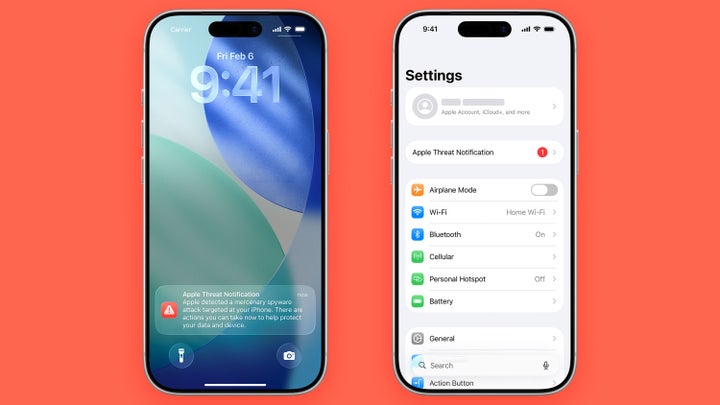
Illustration: HuffPost; Photo: Apple
What To Do If You Got This ‘Mercenary Spyware’ Warning
Turning on Lockdown Mode, an available feature in iOS 16 software or later, is what Apple recommends if people receive this notice.
Using this feature will make your device safer but more inconvenient and less fun to use. Lockdown Mode will block most attachments and link previews on iMessage and filter FaceTime calls from unknown contacts. Shared photos will no longer include location information. You can still make phone calls and send plain texts, but you won’t be able to connect your phone to a Bluetooth accessory or another computer unless it is unlocked. You can read the full list of Lockdown Mode’s capabilities here.
“We have seen that it can prevent some of these types of attacks, but also comes at the cost of some features that people may need day to day,” Kloswoski said. “The good news is that Lockdown Mode is incredibly easy to turn on and off. It only takes a couple taps and a reboot to try out to see if the tradeoffs are worth it for you.”
It’s simple to turn on this feature. Go to your iPhone Settings, tap Privacy & Security, then select Lockdown Mode to enable the feature.
And this kind of extreme security measure has been proven to work in real-world scenarios. Earlier this year, when The Washington Post journalist Hannah Natanson’s phone was seized by federal agents, they were unable to access her phone because Natanson had turned on Lockdown Mode.
If you receive this Apple threat notification, Apple also officially recommends the Digital Security Helpline, a team that supports human rights defenders facing this kind of threat 24 hours a day. This team can run a forensic analysis on what happened to your device and share more direct technical assistance.
But turning on Lockdown Mode isn’t the only action you should take if you’re worried about your security and privacy. Klosowski doesn’t see the feature as a “security panacea.”
He suggests Lockdown Mode as well as other security fundamentals like running software updates as soon as possible, using a strong passcode for your device, and two-factor authentication wherever you can.
That way, if you got this warning and now suspect your Apple device is compromised, you can take all the measures you can to secure your data.

